-
[Java] annotation 에 대해Java 2025. 12. 10. 21:19
annotation이란?
- 컴파일러, JVM, 프레임워크 등이 보는 주석으로 소스 코드에 메타 데이터를 삽입하는 형태
- 코드에 대한 정보 추가 → 소스 코드의 구조 변경, 환경 설정 정보 추가 등의 작업 형태
JDK의 주요 내장 어노테이션 3가지
- @Override : 컴파일러에게 override한 메서드임을 알려줌 → override가 잘 되었는지 컴파일러가 확인
- @Deprecated : 컴파일러에게 해당 메서드가 deprecated 되었다고 알려줌
deprecated 란?
- 코드를 삭제하지 않고, “이 코드는 더 이상 사용하지 마세요”라고 알려주는 표시
- 대체 기능이 있을 때 주로 사용
- @Deprecated가 붙은 메서드나 필드는 IDE에서취소선으로 표시됨
- 이런 코드를 사용할 경우, 컴파일 시 경고(warning) 가 발생함!- @SuppressWarnings : 컴파일러에게 사소한 warning의 경우 무시하라고 알려줌 (예: deprecated 경고, unchecked 경고 등)
// 사용 예시
public class AnnotationExample {

    // 더 이상 사용하지 말라는 표시
    @Deprecated
    public static void oldMethod() {
        System.out.println("이 메서드는 더 이상 사용되지 않습니다.");
    }

    // 새로 권장되는 메서드
    public static void newMethod() {
        System.out.println("이 메서드를 사용하세요!");
    }

    @SuppressWarnings("all") // 매개변수로 all을 주면 모든 경고 무시 (특정 지정 가능)
    public static void main(String[] args) {
        oldMethod(); // Deprecated 경고 발생하지만 SuppressWarnings 덕분에 표시 안 됨
        newMethod();
    }
}
// 실행 결과 이 메서드는 더 이상 사용되지 않습니다. 이 메서드를 사용하세요!
annotation 분석
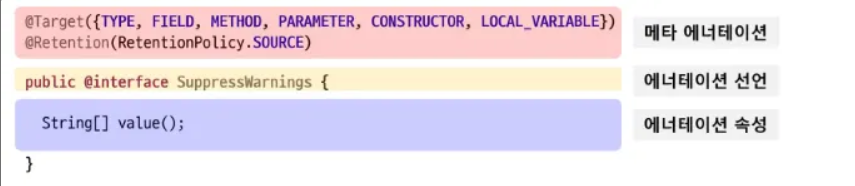
메타 어노테이션?
- 어노테이션을 정의할 때 사용하는 어노테이션
주요 메타 어노테이션 종류
어노테이션 설명 @Retention어노테이션이 유지되는 시점(어떤 시점까지 남아 있을지)을 지정 ( SOURCE, CLASS, RUNTIME 중 하나만 선택 가능) @Target어노테이션을 적용할 수 있는 대상을 지정 @DocumentedJavadoc에 어노테이션 정보가 포함되도록 지정 (소스코드 분석 시 필요한 어노테이션) @Inherited부모 클래스의 어노테이션을 자식 클래스에 상속 (단, 클래스(@Target(TYPE))에만 적용됨) @Repeatable동일한 어노테이션을 여러 번 적용 가능하게 함 (컨테이너 어노테이션 필요) RetentionPolicy의 상수 값

리플렉션(Reflection)이란?
프로그램이 실행 중에 자기 자신(클래스, 메서드, 필드 등)의 구조를 조사하거나 수정할 수 있는 기능 ⇒ **“**코드가 자기 자신을 읽고 해석할 수 있게 하는 기술” 이라고 할 수 있음.
Class<?> clazz = Class.forName("MyClass"); Annotation[] annotations = clazz.getAnnotations(); // 클래스에 붙은 어노테이션 가져오기
이렇게 하면 실행 중에도 어노테이션, 메서드, 필드 정보를 읽거나 수정할 수 있음.
→ 그래서 RetentionPolicy.RUNTIME인 어노테이션만 리플렉션으로 읽을 수 있다는 것!ElementType의 상수 값
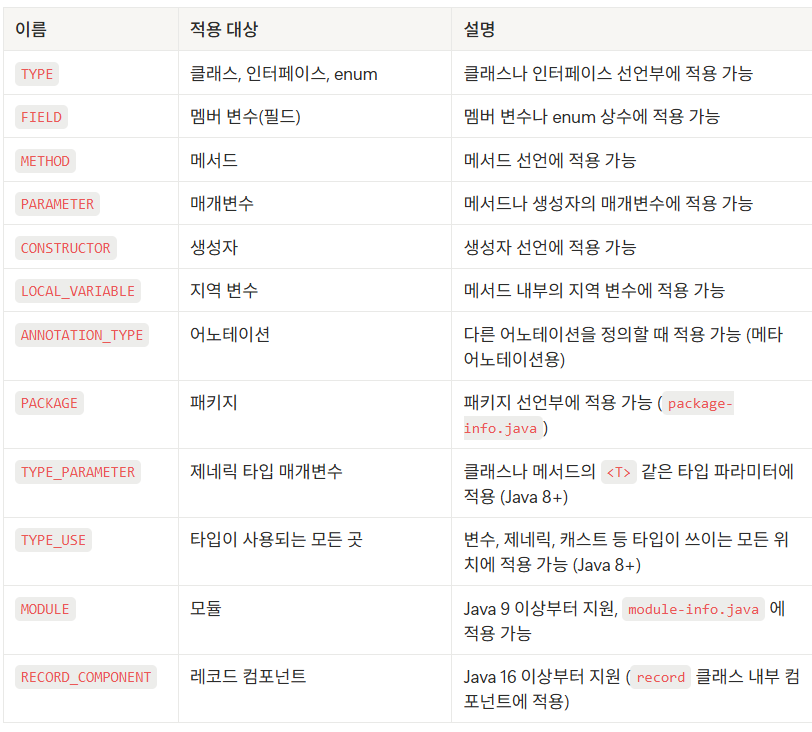
enum (열거형) 이란?
- 서로 관련된 상수(constant)들을 하나의 그룹으로 묶어 표현하는 타입
- 즉, 여러 개의 고정된 값을 한정된 집합으로 정의할 때 사용!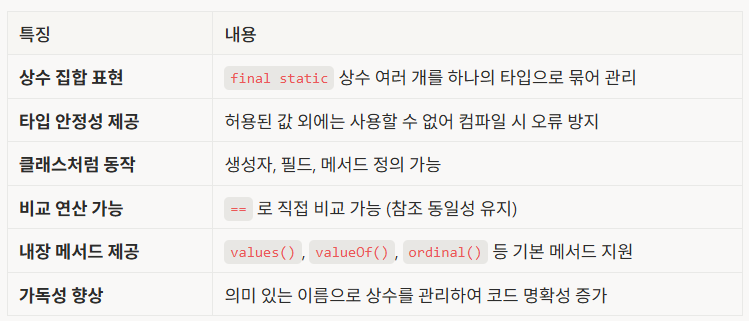
예시 코드
import java.lang.annotation.*;

// ✅ 여러 개의 @Component 어노테이션을 허용하기 위한 컨테이너 어노테이션
@Documented
@Retention(RetentionPolicy.RUNTIME)
@Target(ElementType.TYPE)
@interface Components {
    Component[] value();
}

// ✅ 주요 메타 어노테이션이 적용된 어노테이션
@Documented
@Inherited
@Repeatable(Components.class) // 여러 개의 @Component를 한 대상에 적용 가능
@Retention(RetentionPolicy.RUNTIME)
@Target({
    ElementType.TYPE, ElementType.METHOD, ElementType.FIELD
})
public @interface Component {
    String value();
}

// -------------------------------------------------------
// 부모 클래스에 @Inherited 적용 확인
@Component("BaseClassComponent")
class BaseClass { }

// 자식 클래스: @Inherited 덕분에 @Component 상속받음
class ChildClass extends BaseClass { }

// 여러 개의 @Component 적용 (@Repeatable 덕분에 가능)
@Component("Service")
@Component("Repository")
class MultiComponentClass { }

public class MetaAnnotationExample {
    public static void main(String[] args) {
        // ✅ 1. Inherited 예시
        if (ChildClass.class.isAnnotationPresent(Component.class)) {
            Component comp = ChildClass.class.getAnnotation(Component.class);
            System.out.println("[@Inherited] ChildClass 상속된 컴포넌트: " + comp.value());
        }

        // ✅ 2. Repeatable 예시
        Component[] comps = MultiComponentClass.class.getAnnotationsByType(Component.class);
        System.out.println("[@Repeatable] MultiComponentClass 컴포넌트들:");
        for (Component c : comps) {
            System.out.println(" - " + c.value());
        }
    }
}
// 출력 결과 [@Inherited] ChildClass 상속된 컴포넌트: BaseClassComponent [@Repeatable] MultiComponentClass 컴포넌트들: - Service - Repository
어노테이션 속성
- 속성은 추상 메서드 형태로 선언된다.
- → 메서드 이름이 속성명, 리턴 타입이 속성의 타입이 된다.
String name(); int count();- 어노테이션을 사용할 때는 “키=값” 형태로 속성을 지정한다.
@Example(name = "Computer", count = 3)사용 편의 규칙
- 속성이 하나뿐이고 이름이 value라면, value= 생략 가능!
@Example("Hello")   // @Example(value = "Hello") 와 동일

@Greeting(value = "Hello", level = 2) // O
@Greeting("Hello", level = 2) // X -> 다른 속성이 같이 있으면 생략 불가
2. 배열 속성에 값을 줄 때는 {} (중괄호) 로 묶어야 하지만, 요소가 1개면 생략 가능! (빈 배열은 생략 불가)
@Example(tags = {"A"})
// == @Example(tags = "A")

@Example2(tags = {"A", "B"})
// @Example2(tags = "A", "B")는 문법 오류.
3. 어노테이션 정의에서 요소에 default 값을 지정하면, 사용할 때는 생략 가능!
public @interface Example { String value() default "hello"; int level() default 1; } // 사용(모두 생략 가능) @Example // 모든 값 default 사용 @Example(level = 5) // value는 "hello"로 자동 적용 @Example("hi") // == @Example(value = "hi", level = 1) - 컴파일러, JVM, 프레임워크 등이 보는 주석으로 소스 코드에 메타 데이터를 삽입하는 형태